
Universities use digital asset management (DAM) to organise photos and videos, record usage restrictions and control who can access content. For marketing and communications teams, a central library makes it easier to check whether an image can be reused and find related records when someone requests a change.
DAM can support privacy compliance, but software alone does not make a university compliant. Your institution still needs an appropriate lawful basis for processing personal data, clear policies and people responsible for applying them.
This guide focuses on university photo and video libraries under UK and EU data protection rules.
Do universities always need consent to use student photos?
No. Consent is one possible lawful basis for processing personal data, rather than a requirement for every student photograph. The appropriate basis depends on the purpose and circumstances. Your data protection officer should help establish the approach before content is collected or published. The ICO explains when consent is appropriate, including situations where people may not have a genuine choice.
For example, a staged recruitment campaign, a graduation gallery and an alumni archive may involve different purposes and restrictions. Permission for one use should not be treated as permission for every future campaign.
In the UK, the UK GDPR and Data Protection Act 2018 remain part of the legal framework. The Data (Use and Access) Act 2025 amends these laws; it does not replace them. Universities operating in the EU must also consider the EU GDPR and applicable national requirements.
Keep four separate questions clear: does the university have a lawful basis to process the personal data, does the planned use match any release or consent terms, does it have the necessary copyright licence, and is the person downloading the file authorised to access it? A DAM permission setting answers only the last question.
Keep consent and usage records connected to the right assets
Universities often reuse images across admissions, alumni relations, athletics and fundraising. A central library helps teams check the same information instead of relying on release forms in separate inboxes.
Where your university relies on consent, keep a record of who agreed, when and how they agreed, and what they were told. Include the approved purposes and the relevant version of the consent request or privacy information. The ICO’s consent record guidance explains what evidence to retain.
Connect each asset to its supporting record using a consistent reference. If a signed form contains private contact details, keep it in an appropriately restricted location rather than exposing it in a public gallery. Give publishers the usage information they need without sharing unnecessary personal data.
Consider a hypothetical alumna, Jennifer Davis, who speaks at university events. Before reusing her event photograph in a recruitment campaign, the communications team should check the planned use against the university’s recorded basis and any applicable release, consent or licensing restrictions. Finding the photograph is only the first step.
Use metadata to make restrictions easier to check
Consistent metadata helps staff search for content and understand whether it is ready for use. PhotoShelter’s custom metadata fields support preset tags, so teams can apply shared terms instead of using different wording for the same status.
Agree on the information your team needs to check before publishing:
- People and event: verified names, event name and capture date.
- Usage status: approved for the stated purpose, restricted or awaiting review.
- Supporting record: a reference to the relevant consent, release or institutional decision.
- Permitted use: approved channels, campaign limits and any exclusions.
- Review responsibility: the team responsible for checking the record and the next review date, where applicable.
These are suggested records for your workflow, not a list of automatic PhotoShelter checks. Choose suitable fields and systems with your library administrator. Keep internal-only information out of public-facing metadata, and verify how it appears to different users.
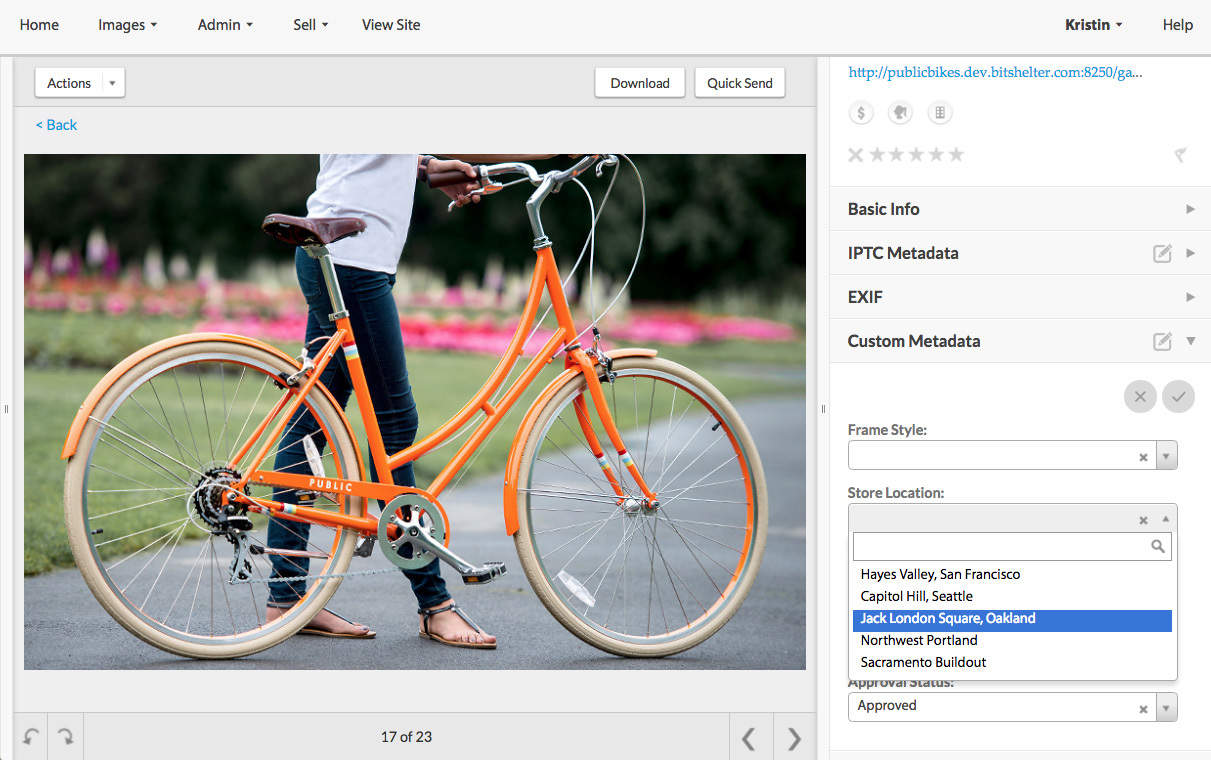
PhotoShelter custom metadata tags are not embedded in files downloaded from the Library or Portal. Make sure recipients receive any necessary usage instructions through your approved sharing process. Do not assume restrictions will travel with every exported image.
Control who can view and download university content
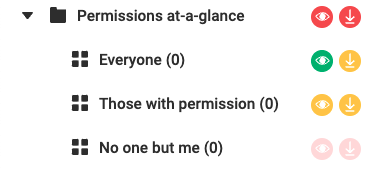
A searchable library should not make every file available to everyone. Separate content awaiting review from content approved for wider use, and give staff, student workers, freelancers and external partners access appropriate to their roles.
PhotoShelter’s sharing permissions let you grant specific people or groups access to galleries and choose whether they can view or download files. Review access when someone changes roles or leaves the university.
A password or restricted gallery controls access through the platform. It cannot prevent someone from copying or forwarding a file they have already downloaded. Clear usage instructions and a process for contacting recipients remain important.
Plan for consent withdrawals and privacy requests
Searchable names, event details and record references can help staff locate relevant assets when someone requests access, a correction or removal. Search results still need review: incomplete tags, duplicate files and copies outside the DAM can leave gaps.
If Jennifer asks the university to stop using her photographs, route the request to the responsible privacy team. Where processing relies on consent, the university must respect withdrawal. An erasure request requires a separate assessment: the right to erasure applies in particular circumstances and has exceptions.
Give staff a clear process:
- Record the request and send it promptly to the responsible team.
- Find related assets, supporting records and known published or shared copies.
- Apply any temporary restrictions the privacy team directs while it assesses the request.
- Carry out the decision across the library and relevant channels, notifying recipients where required.
- Document the action and update the asset’s status so it is not mistakenly reused.
Deleting a file from the DAM does not remove copies from university websites, social accounts or a partner’s computer. Include those destinations in your response process.
Review privacy requirements before enabling facial recognition
PhotoShelter’s PeopleID helps tag people in photos and videos. It does not determine whether a person has consented to publication or whether a particular use is lawful. Staff must check the relevant records before publishing.

Facial recognition used to uniquely identify people involves special-category biometric data under UK GDPR. It requires both a lawful basis and an appropriate special-category condition. The ICO’s biometric data guidance also requires a data protection impact assessment before using a biometric recognition system. Involve your data protection officer before enabling it.
Set retention rules and review your DAM provider
Do not treat an extensive university archive as a reason to retain every item indefinitely. Agree on retention and review rules for assets, supporting records and activity logs. Distinguish ongoing marketing use from any separately justified archival purpose, and record who can approve continued retention or deletion.
When evaluating a provider, ask about access controls, authentication, data locations, processing agreements, subprocessors, international transfers, deletion and backup handling. Check how the service supports your institution’s policies rather than assuming a security certification covers every privacy obligation. PhotoShelter’s privacy and security information is a starting point for that review.
Build a university media library staff can use with confidence
The most useful DAM workflow makes the next decision clear: who can access an asset, what it may be used for and who to ask when the record needs review. Start with shared metadata, controlled access and a documented process for changes, then review those practices as your library grows.
Explore PhotoShelter for education to see how a central photo and video library can support teams across your university.



