Digital asset management (DAM) is the process of organizing, finding, sharing, and controlling digital content such as photos, videos, graphics, and documents. DAM software gives teams a central library with searchable metadata—descriptive information such as keywords, captions, and dates—and permissions that control access. It helps marketing and creative teams find approved content faster, reuse existing assets, and maintain consistent branding.
Your digital asset management software should serve as the central source for approved content, giving team members, clients, contractors, and other stakeholders access to the assets they need, with permissions controlling what each person can view or download.
In this blog, we’ll explore:
- What is a digital asset?
- Top 5 challenges managing digital assets
- How poor digital asset management hurts company goals
- Benefits of digital asset management software and use cases
- Why DAM is important for marketing and creative teams
- How different industries use DAM systems
- The expanding role of DAM systems
- How AI is changing DAM
- Embracing DAM systems for a better digital future
What is a digital asset?
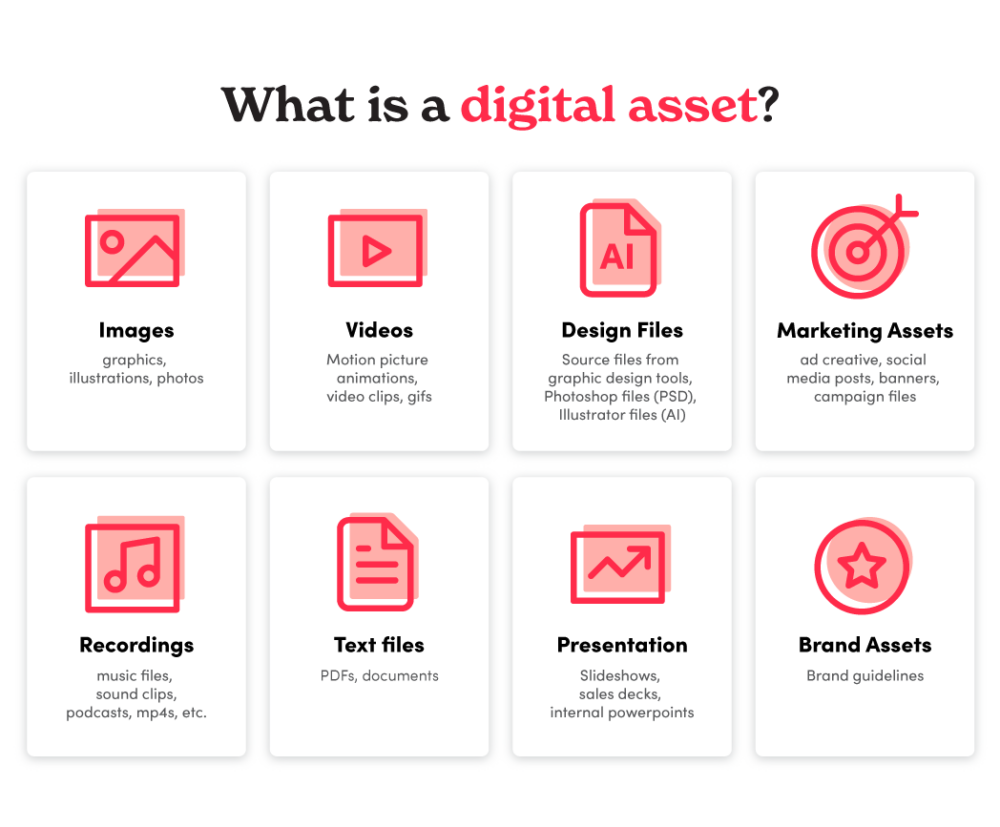
A digital asset is a file created or stored electronically that an organization uses in its work. Examples include photos, videos, logos, graphics, audio files, presentations, and documents.
Top 5 challenges in digital asset management
Outdated asset management methods make it harder for marketing and creative teams to keep up with content demand.
Common challenges include:
- Looking for content: Searching across folders, drives, and platforms makes it harder to find the right asset when it is needed.
- Duplicating completed content: Teams may recreate assets that already exist because they cannot find them.
- Using outdated content: Without a clear source for approved assets, teams can publish old logos, images, or campaign materials.
- Managing disconnected systems: Storing assets across several platforms creates extra steps for finding, sharing, and maintaining content.
- Keeping up with content demand: 84% of marketing and creative professionals said pressure to create assets and content faster had increased over the previous 12 months.
How poor digital asset management hurts company goals
- Time and effort wasted: Recreating existing assets uses time and budget that could support new work.
- Less time for high-value work: Manual file requests and searches pull teams away from creative and strategic tasks.
- Slower campaigns: Checking multiple systems for approved files can delay reviews and publishing. 46% of marketing and creative professionals said their content gets stuck in review.
- Less control over assets: Inconsistent permissions make it harder to control who can access and download content.
- Inconsistent branding: Outdated logos and campaign materials can undermine a consistent brand experience.
- Unused assets: Content that people cannot find is less likely to be reused, reducing the value of the original investment.
Benefits of digital asset management software and use cases
DAM software helps teams organize, find, and distribute content from a central library. Among the DAM users in PhotoShelter’s survey, 66% said it helps their teams organize content. Here are eight capabilities to consider, with examples of the challenges they help solve.

To get more value from their content, companies need a clear process for organizing, managing, and sharing assets with customers, prospects, and other audiences.
1. Asset organization
DAM software organizes assets using metadata, tags, and folders so teams can find and manage content more easily.
How asset organization works with DAM:
Without DAM: Marie Rossow, marketing director at Garden of the Gods Resort and Club, struggled to manage a high volume of digital assets. Significant hurdles slowed her workflow and the resort’s marketing campaigns, which helped drive bookings for meeting spaces, rooms, and restaurants.
The resort was storing files in multiple systems including Google Drive, OneDrive, Box, and Dropbox. Marie recalls:
“I’m being tasked with creating this social campaign, and I need to find pictures of the golf course in spring… just trying to find that took over an hour.”
With DAM: Transitioning from multiple disjointed storage systems to a single, comprehensive digital asset management platform significantly improved Marie’s work life. “The simplicity of being able to tag everything, and have everything searchable…We can just pull the assets right away and be able to share them with who we need,” says Marie.
PhotoShelter replaced the multiple platforms Marie had been using with one centralized library. She also was able to create a valuable archive of historical assets dating back to 1949. PhotoShelter also made it easy for Marie to retrieve and reuse high-quality images for local magazine features.
Learn more about DAM for hospitality in the Garden of the Gods Resort and Club Case Study.
2. Search and retrieval
Keyword search, filters, and tools such as AI Visual Search help teams find relevant assets.
How search and retrieval functionality work with DAM:
Without DAM: Jennifer White, Senior Manager of Digital Assets for the Philadelphia Eagles’ content and production team, faced significant challenges when she assumed her role in 2014. There was no system to keep digital photos organized and there were thousands of historic, physical photos that needed to be digitized to run effective marketing campaigns.
Search was difficult, and slow, manual distribution meant missed opportunities to engage fans. Jennifer explains:
“No matter how many times we trained people [on the old system]…it was very cumbersome. It just wasn’t user-friendly. It wasn’t like anybody could jump in and find assets easily” says Jennifer.
With DAM: By leveraging PhotoShelter’s AI functionality, alongside Socialie’s content distribution automation capabilities, the Eagles were able to modernize their workflow and get content into their players’ hands in seconds, taking fan engagement to the next level. Now, anybody on the team can find what they need fast.
Learn more about DAM for sports in the Philadelphia Eagles Case Study.
3. Collaboration
A shared DAM library gives team members access to the assets they need to collaborate on creative projects, even when they work in different locations.
How DAM supports creative collaboration:
Without DAM: Sydnye White, VP of Content and Storytelling for Special Olympics, was using several disconnected systems to manage the organization’s digital assets. She and her team faced a few major obstacles in their day-to-day workflow, which impacted their ability to get out content in real time.
Too many tools made searches time-consuming, sharing was difficult, and workflow delays hurt campaign efforts. Sydnye explains:
“News is now… It is certainly not news 24 hours later. It’s important that we have editors in different time zones that can keep feeding the media assets that are captioned, tagged, and organized. They don’t have to go search somewhere else. They know there’s a one-stop shop for Special Olympics all the time, no matter where in the world they are” says Sydnye.
With DAM: Sydnye and her team were able to support a worldwide workflow. The organization’s distributed network of employees and volunteers can easily collaborate with 24/7 access to a centralized DAM platform. They were able to facilitate media coverage and brand exposure. Their communications team could create the best content possible for marketing materials and fundraising campaigns to drive donations and inspire volunteers.
Learn more about DAM for nonprofits in the Special Olympics Case Study.
4. Access to approved assets
A central library helps teams find approved content and reduces the chance of using outdated assets.
How DAM helps teams find approved assets:
Without DAM: Cynthia Klusmeyer, Creative Services Manager, and Caitlin Hernandez, Project Coordinator at Baptist Health, worked with photos stored on an internal server, which created several issues. These included inadequate control, lack of searchability, and diminished brand integrity.
“We have a tremendous amount of assets, and they’re always being shuffled between so many different hands. With the old server, people would just start digging, and then they would either get frustrated and couldn’t find what they needed, or they would start using old assets. PhotoShelter has made it easier to keep what we want to be used at the forefront. The search feature is life-changing,” says Caitlin.
With DAM: PhotoShelter simplified creative project management and asset organization at Baptist Health. The creative team can configure access to make approved assets easier to find and share across the organization. “PhotoShelter gets what we need into people’s hands quicker — and in an easier way. It’s very intuitive and straightforward,” says Caitlin.
Learn more about DAM for healthcare in the Baptist Health Case Study.
5. Access and download permissions
Access and download permissions help teams control who can view and use their content.
How access and download permissions work with DAM:
Without DAM: Sam Craft, Assistant Director of Visuals and Multimedia, at Texas A&M AgriLife, needed to make the organization’s digital assets widely available while controlling who could download them. Before PhotoShelter, Texas A&M AgriLife was using a consumer solution, Flickr. This meant that Sam couldn’t customize permissions or require logins to access Texas A&M AgriLife’s image libraries.
Texas A&M AgriLife was using a combination of makeshift internal systems and Flickr to store photos, which resulted in a lack of security and control.
“We had an internal system that ran on a free server. It was out of date. Servers fail, and when you don’t pay attention to it, retention is gone and assets are lost,” says Sam.
With DAM: Texas A&M AgriLife uses PhotoShelter to store its assets and control access to content. Sam can configure permissions to manage who can view and download the organization’s photos.
Learn more about DAM for higher education in the Texas A&M AgriLife Case Study.
6. Streamlined content sharing
A shared asset library reduces the need to package and send files manually for each content request.
How DAM streamlines content sharing:
Without DAM: Mads Pihl, Head of Photography and Market Development for Visit Greenland, wanted to reshape Greenland’s global reputation and attract more visitors. But a combination of a broken content management system, dated content, and too many content requests to handle was making it a challenge. Using Flickr and Dropbox was not making the job easier for anyone.
After investing considerable time and money into Flickr and Dropbox, Mads was still getting multiple requests for content and would still often have to package photos into zip files and send them to partners. “I wasted so much time adding [content] to Flickr,” says Mads.
With DAM: Mads moved his image database over to PhotoShelter for Brands, bringing his content into one place and simplifying sharing.
“[PhotoShelter] is formidable compared to Flickr, you can’t even compare,” says Mads. “It feels like it’s made for someone like us.” Using a centralized asset management system, they were able to streamline assets for stakeholders to build a clear and concise brand story.
Learn more about DAM for hospitality in the: Visit Greenland Case Study.
7. Integrations
DAM integrations connect the asset library with creative software, content management systems, and collaboration tools. Explore PhotoShelter DAM integrations to see supported tools.
How integrating with other tools works with DAM:
Without DAM: Kimberley Fowke, Director of Communications of the Army Rugby Union (ARU), was trying to build the brand on a tight budget. The team’s process for working with photographers was time-consuming. Photographers would give ARU physical discs with photos stored on them, so if she wanted a particular image, she’d have to manually flip through folders of discs to find the right one. Getting images from photographers onto the website or social media was no easy task, which meant establishing a high-quality brand online was all but impossible. Then they met Geraint Ashton Jones.
Alligin UK Director (and former member of the Royal Navy) Geraint Ashton Jones created a workflow that would get images from the rugby pitch to ARU Director of Communications Kimberley Fowke as quickly as possible. During matches, File Transfer Protocol (FTP) connections let photographers upload images straight from their cameras into the appropriate PhotoShelter gallery in seconds.
“The biggest selling point of PhotoShelter is that it is genuinely intuitive. It’s easy to use, and it’s truly collaborative,” says Jones, Director of Alligin UK.
With DAM: Kimberley also makes heavy use of PhotoShelter’s Canva integration, which allows her to access ARU’s photos in Canva and quickly create social-media-ready designs with templates she has previously created. For an organization that’s operating with a tiny staff and limited resources, ARU is still able to put out professional-looking branded content with the help of PhotoShelter and its integrations. “What we’ve worked on over the last few years using PhotoShelter is our ability to put out content in real time. It’s enabled us to up our game in our social media,” says Kimberley.
Learn more about the Army Rugby Union Case Study.
8. Security
Security features are essential for protecting sensitive digital assets. DAM systems often include access controls, encryption, single sign-on (SSO), and other security measures to safeguard against unauthorized access or data breaches.
How security features work with DAM:
Without DAM: Chris Rakoczy, a staff photographer for Hartford HealthCare, joined in 2015 as a contract photographer and transitioned to a full-time role. As the organization’s new Digital Asset Librarian, it was Chris’s responsibility to uncover what wasn’t working and how to fix it. He found a lack of organization and no easy way to collaborate and provide access to 37,000 people on the Hartford team. They were buried in requests and every asset took a long time to find and share.
“If we’re out at an event, and people have to wait for us to get back to our desks, find the thing they want, and send it, it could be too late for their needs,” says Chris.
With DAM: PhotoShelter Workspaces helped Hartford HealthCare (HHC) employees manage and collaborate on creative projects. HHC also uses PhotoShelter’s single sign-on (SSO) feature to streamline access and manage authentication without having to send individual user invites. The case study describes how invited access made the library available across an organization of 37,000 colleagues.
Cloud-based access supports distributed teams. With PhotoShelter’s cloud-based library, Chris and his team can access content wherever they have an internet connection. That means HHC’s staff photographers can easily upload images to PhotoShelter and designers can quickly access the files they need to complete their work.
“Through PhotoShelter, we’ve been able to empower everybody in the organization to get what they need when they need it — and also discover things they didn’t know they needed. They can pull something down within a couple of minutes, versus probably hours or days,” says Chris.
Learn more about DAM for healthcare in the Hartford Healthcare Case Study.
Why digital asset management software is important for creative and marketing teams
Disorganized digital assets create inefficiencies and creative bottlenecks. DAM helps creative and marketing teams access, share, and reuse approved content from one place.
Here are the top 4 ways DAM is improving the way your marketing and creative teams work.
1. Consistent branding
Maintaining a consistent on-brand image ensures uniform use of logos, images, and other assets across various channels – protecting brand integrity.
When multiple creators work without shared guidelines or approved assets, their content can look and sound inconsistent.
A DAM gives teams a central place to find approved logos, images, and brand guidelines. Integrations with design tools can also help creators use approved assets in branded templates.
Brand management in DAM: Special Olympics International’s adoption of PhotoShelter revolutionized its approach to consistent branding. Previously challenged by a fragmented system with assets scattered across various platforms, Special Olympics faced difficulties in maintaining a unified brand image. This inconsistency was a significant obstacle, given their extensive archive spanning over 50 years, used in diverse campaigns and communications.
The introduction of PhotoShelter’s DAM enabled Special Olympics to centralize and consolidate its digital assets. This singular platform allowed for efficient uploading, storing, searching, and sharing of all assets, ensuring consistent branding across all materials. The ability to collaborate seamlessly across different regions and time zones, with easy access to standardized and updated assets, proved pivotal in reinforcing their brand identity globally.
This strategic move not only enhanced their branding efforts but also facilitated better media coverage, volunteer engagement, and fundraising. By simplifying and unifying their digital asset management, Special Olympics ensured that every piece of content, regardless of its origin, aligned perfectly with their brand’s look and ethos, significantly contributing to their worldwide recognition and impact.
2. Cost and Time Savings
When content is everywhere, your creative and marketing teams can’t easily find anything. By streamlining the process of finding and using files, your teams can focus more of their time on producing creative assets and less time on searching.
Cost and Time Savings with a digital asset management system: Initially burdened with an unorganized archive of historical photos on Google Drive, Jackson State University (JSU) struggled with efficiently promoting the university and responding to media requests.
With PhotoShelter’s DAM, JSU transformed its cumbersome archive into an updated, searchable database. Metadata tagging and advanced search features enabled rapid location and sharing of images, significantly reducing time spent on asset management.
This efficiency supported JSU’s marketing and branding efforts.
The ability to quickly share high-quality, relevant content with internal and external stakeholders bolstered JSU’s visibility and appeal.
PhotoShelter’s impact was clear: faster, more effective communication that resonated with potential students and partners, highlighting the value of a well-organized digital asset system in higher education marketing.
The centralized library helped JSU’s team spend less time managing files and more time creating and sharing content.
3. Streamlined Marketing and Publishing Workflow Processes
In the fast-paced world of marketing and publishing, DAM software is pivotal in streamlining crucial processes like approvals, reviews, and publishing. This efficiency greatly reduces time-to-market for campaigns and content.
Streamlined Marketing and Publishing Processes with DAM solutions: The Philadelphia Eagles’ adoption of PhotoShelter and Socialie marked a game-changing shift in their digital asset management strategy.
This digital transformation enabled the team to eliminate bottlenecks, save time, reduce costs, and ensure their content reached fans swiftly and effectively.
In the dynamic world of sports, where timing and engagement are crucial, the Eagles’ approach set a new standard in digital content management and fan interaction.
4. Scalability and Future-Proofing
As organizations grow, they need to manage more content and give more people access to it. A scalable DAM system helps teams handle that growth without scattering assets across additional tools.
Scalability and Future-Proofing with DAM solutions: As a large institution with a growing need for efficient content distribution, Brigham Young University’s (BYU) transition to PhotoShelter addressed its pressing challenges in handling a vast array of visual assets.
The introduction of single sign-on (SSO) and a searchable photo library with advanced AI features enabled BYU to accommodate the increasing demand for instant, easy access to a large volume of images.
This scalability was essential for the university’s expanding community, comprising thousands of students, faculty, and staff. The system’s capacity to modernize processes and efficiently manage an ever-growing digital library showcased its potential for future expansion and adaptation to evolving needs.
Wireless camera uploads using FTP also helped BYU share event photography quickly.
This workflow helped photographers deliver images to the people who needed them while events were still happening.
The agility and flexibility of a DAM solution ensured that BYU could continue to effectively manage its visual assets and their lifecycle, even as the volume and complexity of these assets grew over time.
How different industries use digital asset management systems
Media and Entertainment
These industries use DAM for storing, cataloging, and retrieving large volumes of digital files such as films, music, and digital artwork. It simplifies the process of content distribution, digital rights management, and archiving.
Education
Educational institutions use DAM to organize and share educational resources, research materials, and administrative documents. It facilitates easy access to learning content for both educators and students, enhancing the educational experience.
Healthcare
Healthcare marketing and communications teams use DAM to organize approved photography, brand assets, and educational materials. Access permissions help teams share the right content with employees, agencies, and media partners.
Government and Non-Profit Organizations
These sectors use DAM to manage public records, documents, and multimedia content for internal use and public dissemination. Access controls help teams manage internal content and share approved materials with the public.
Tourism and Hospitality
These industries use DAM to manage promotional materials such as travel guides, brochures, and marketing videos. It helps in creating attractive and consistent marketing campaigns to promote destinations and services.
Sports
Sports organizations use DAM to manage team photos, game footage, and merchandising materials. It’s crucial for real-time fan engagement, media distribution, and brand promotion.
The expanding role of digital asset management systems
The world of digital content is expanding, and DAM software stands out as a key organizational tool. Initially developed for basic digital media management, DAM has evolved into advanced platforms featuring AI, cloud computing, and enhanced search functionality.
Today, DAM is more than just a storage solution; it’s essential for strategic digital asset management. It not only secures valuable content but also optimizes its use, boosting brand consistency and creative effectiveness. DAM has become a cornerstone for businesses of all sizes and industries in the digital era, driving both creative and operational efficiency.
How AI is changing digital asset management
AI-powered DAM tools can help teams find assets through visual search and automate tagging. PhotoShelter’s AI tools include visual search, similarity search, and automated tagging to help teams discover and reuse content in their libraries.
PhotoShelter’s AI Assistant also helps teams rename files, create gallery structures, and standardize metadata using plain-language requests. These capabilities reduce repetitive library maintenance and help teams keep growing collections organized.
Embracing digital asset management systems for a better digital future
DAM systems help teams find content faster, share approved assets, and control access as their libraries grow. With a central place to organize and reuse content, marketing and creative teams can spend less time managing files and more time putting them to work.
Ready to evaluate your options? PhotoShelter’s DAM Buyer’s Guide includes criteria, vendor questions, and a scorecard to help you choose a system for your team.
Start organizing and managing your digital assets efficiently today with PhotoShelter. Take a Tour.