Share
PhotoShelter vs. MediaValet
Comparing PhotoShelter and MediaValet for your digital asset management needs? Discover how they stack up so you can choose the right DAM software ...

PhotoShelter is built for teams that produce visual content at high volume and need it moving. Going from camera to social feeds fast, or from live broadcast to shareable clip before the event ends.
MediaValet is built on Microsoft Azure, and for organizations that run everything through Microsoft, that alignment may be the deciding factor.
For most marketing and creative teams, PhotoShelter’s proprietary setup is the stronger choice. It combines AI search with real-time distribution, and includes its core features in one subscription.
Here’s everything you should know.
Ease of Use and Onboarding
With PhotoShelter, every customer gets a dedicated onboarding manager, and most teams are live within days. For large libraries, PhotoShelter’s professional services team migrates and organizes your assets for you.

MediaValet’s onboarding is well reviewed, but several recent MediaValet reviews describe an adjustment period after its September 2025 interface redesign.

Media and Visual Asset Management
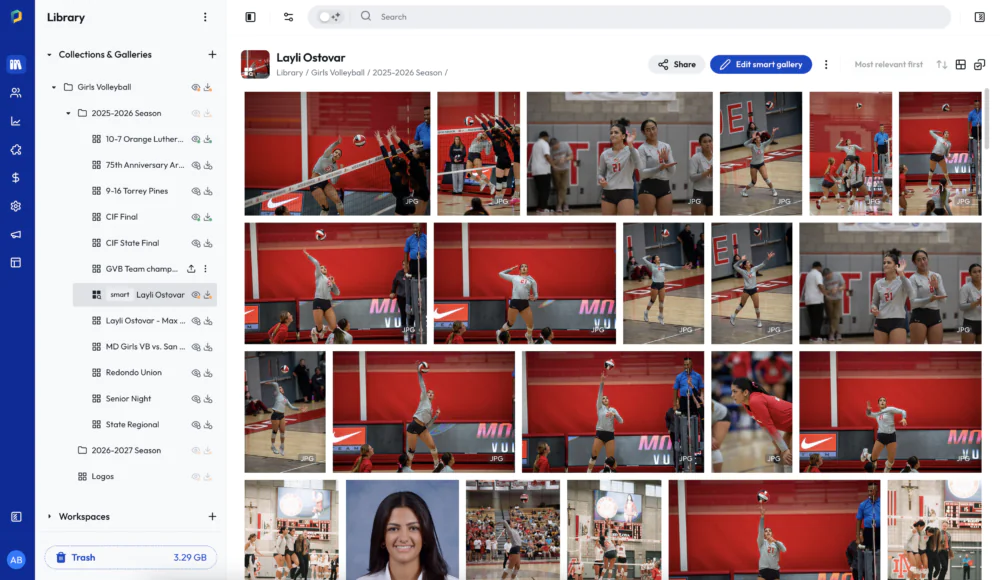
PhotoShelter manages photos and video in one library, with permissions set by user, team, gallery, or file type.
- Smart Galleries update themselves as new assets arrive, so press and sponsor portals stay current without manual upkeep.
- QuickSend shares files with anyone in one click, no login required.
- UGC management helps teams collect, approve, organize, and reuse photos and videos from fans, customers, and partners.
- Content derivatives resize and reformat assets for each channel.
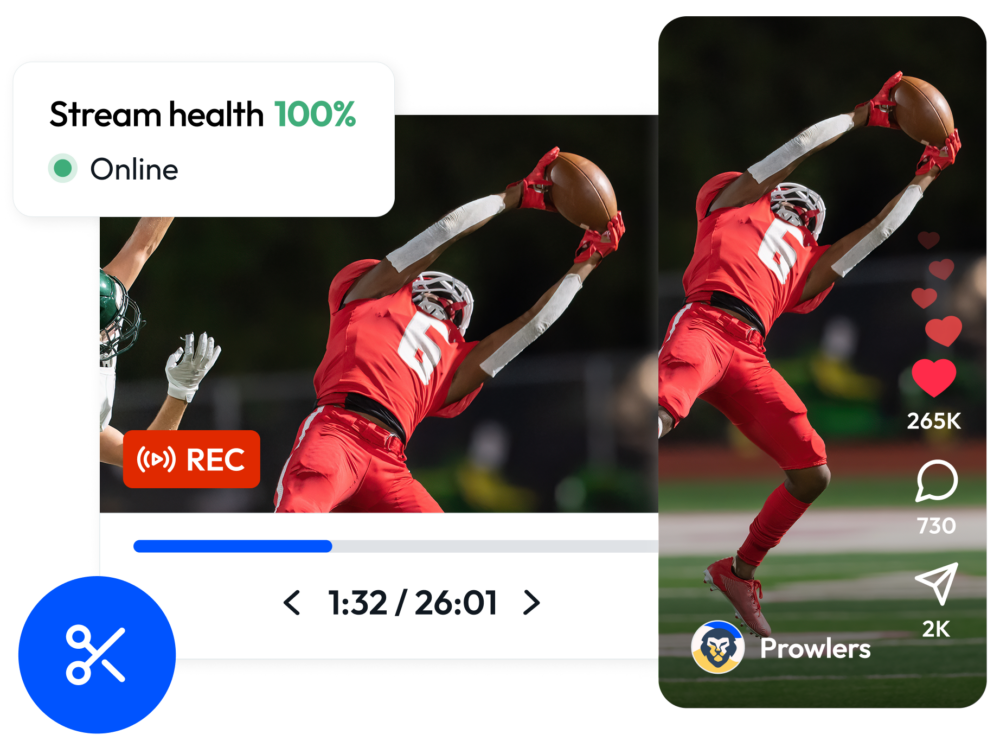
And Live Stream Video Workflow brings your live broadcast into PhotoShelter as it happens. Your team clips highlights during the event and pushes them to social through Socialie while fans are still watching. When the broadcast ends, the full video lands in your Library: AI-tagged, transcribed, and searchable with AI Visual Search.
AI and Search
Customers choose PhotoShelter because its AI and search tools help them find the right content and get it out while the moment still matters.
- PlayerID and LogoID. Find athletes by jersey number and locate every image that includes a specific brand logo, without relying on facial recognition or manual tags.
- AI transcription. Video becomes searchable by what was said, not just what someone remembered to tag.
- AI alt text. Generated automatically, keeping your library aligned with WCAG 2.2 AA accessibility standards without extra work.
- AI Visual Search. Type what you’re picturing, like “students on the quad at sunset,” and get matching images. No tags required.
Security and Compliance
Each platform holds SOC 2 Type 2 certification and operates under ISO 27001 controls.
PhotoShelter offers: 3rd-party audited for HIPAA compliance, FERPA-ready access controls for education, GDPR readiness, and an interface that meets WCAG 2.2 AA accessibility standards, ahead of the ADA mandate that took effect in April 2026.
Pricing
MediaValet’s pricing guide lists asset migration, taxonomy setup, advanced integrations, AI-powered features, and expanded storage as costs that may come on top of the base subscription.
PhotoShelter includes onboarding, support, and core features in the subscription.
PhotoShelter vs. MediaValet: Feature Comparison
| Capability | PhotoShelter | MediaValet |
| AI search without tags | AI Visual Search | Smart Search |
| Auto-tagging at upload | Included | Included |
| AI alt text and captions for accessibility | Included | Not advertised |
| Live broadcast ingest (RTMP) | Included | Not advertised |
| Clip video during a live event | Included | Not advertised (in-platform clipping for stored video) |
| Video transcription | Included, English, searchable transcripts | Included, subtitles in 100+ languages |
| Social distribution and tracking | Included | Not advertised |
| Unlimited invited users | Included | Included |
Who Should Use PhotoShelter?
Choose PhotoShelter if your organization runs on visual content. Sports teams, universities, health systems, nonprofits, and travel brands use it to move photos and video from capture to publish while the moment still matters.
It’s the perfect fit when you need live event workflows, social distribution through Socialie, accessibility compliance, and a partner that stays involved after onboarding

Who Should Use MediaValet?
MediaValet is a credible choice for organizations built around Microsoft. If your teams spend their day in SharePoint, Teams, and Office 365, MediaValet’s Azure foundation and in-app Office editing fit naturally.
Frequently Asked Questions
What’s the ROI of using DAM software like PhotoShelter?
DAM ROI shows up as time returned and work not repeated: faster searches, fewer re-shoots, no hunting for the approved version. Food for the Hungry credited its PhotoShelter DAM with a 33% increase in profitability over four years. PhotoShelter Analytics tracks downloads, searches, and reuse so you can measure your own return.
Which DAM software is more secure: PhotoShelter or MediaValet?
Both hold SOC 2 Type 2 certification, operate under ISO 27001 controls, and encrypt data in transit and at rest. PhotoShelter adds compliance depth for healthcare, education, and government, including WCAG 2.2 AA accessibility. For most companies, both are secure enough; match certifications to your industry’s requirements.
How do the two platforms handle video?
PhotoShelter covers the full video lifecycle: ingest live broadcasts, clip highlights while the event is still running, collect user-generated video content, search by transcript, embed video anywhere, and distribute clips for others to post on their social media accounts through Socialie. MediaValet manages stored video well, with AI transcription and subtitles in 100+ languages, but doesn’t advertise a live broadcast workflow.
Which DAM software handles metadata better?
Both auto-tag assets with AI at upload. PhotoShelter adds metadata templates to keep fields consistent, AI Alt Text to create accessible descriptions, and PlayerID and LogoID for teams that need athlete and sponsor tagging. And if you ever leave, PhotoShelter embeds your metadata in exported files, so years of tagging work goes with you.
How do I migrate from MediaValet to PhotoShelter?
PhotoShelter’s professional services team supports your migration from planning through launch. They help scope the project, guide your team through metadata and folder structure decisions, and keep the move on track. You’ll also work with a dedicated onboarding manager throughout the process.
How long does DAM migration take?
Most PhotoShelter teams are up and running within 30 days. Larger libraries with complex folder structures or metadata may take longer. PhotoShelter supports your team through planning, setup, and launch.
What happens if I need help after onboarding?
PhotoShelter pairs you with a dedicated onboarding manager at launch, then gives you ongoing access to product specialists. Support doesn’t expire when setup ends.
Ready to transform your team’s creative workflow?
You May Also Like
-
PhotoShelter News, Trendsetters
Meet 2026 PhotoShelter UPAA Grant Winner Levi Sim
Read our interview with Levi Sim, photographer at Utah State University and winner of the 2026 PhotoShelter UPAA Grant.
-
Brandfolder Alternatives: PhotoShelter vs. Brandfolder in 2026
Brandfolder and PhotoShelter both help teams organize, manage, and share digital assets, but they’re built for different kinds of work. PhotoShelter’s the stronger Brandfolder alternative for teams that manage high volumes of photos, videos, and live event content and need to move it quickly. It’s built for real-time visual workflows, with AI search, automatic tagging, […]
-
PhotoShelter vs. Canto
Comparing PhotoShelter and Canto for your digital asset management needs? Discover how their AI search tools, accessibility compliance, live event video workflows, and PIM capabilities stack up so you can choose the right DAM platform for your creative team.


